Showing posts with label RSS. Show all posts

May 22, 2007

RSS Feeds: Science Direct

Science Direct now has RSS feeds!! I think that's the last of the big science publishers.

About the feeds:

  • The article feeds will show up on the journal homepage as well as any browsable list of titles--but they did not show up until my proxy authentication kicked in.
  • You don't right-click-to-copy the links in the icon. Instead, left-click to bring up a popup that will give you the RSS feed URL and several auto-subscribe buttons (Bloglines, My Yahoo, etc.)
  • They also have feeds for cited reference, topic and search alerts. The topic and search alerts require a Science Direct username and password.

AddThis Social Bookmark Button

March 12, 2007

Add This Widgets (RSS/Bookmarking)

I guess these have been around for a while, but I only noticed them this week on Time.com.

The Add This widgets are fantastic way to offer subscription and bookmarking features on your blog without having to create separate buttons for each RSS reader or social bookmarking system you want to include.

The widgets are easy to set up and customized, and then you just copy/paste the resulting code. Clicking the Subscribe to SD Librarian button takes your user to a page where they can select one of 22 web-based or desktop reader. The Bookmark SD Librarian widget is available in two versions: bookmark the entire site or bookmark a particular entry--with 30 social bookmarking sites to choose from.

The code for the RSS and "Bookmark this site" widgets was placed in the Subscribe HTML/Javascript page element in New Blogger. The code for "Bookmark this blog entry" got pasted into the template with no problems.

With an account, one can: 1) get some user statistics for each page that uses one of the widgets, or 2) customize the Add This screens to bypass the prompt pages and go right to subscribing to the feed or bookmarking the page.

AddThis Social Bookmark Button

March 02, 2007

RSS/Podcast Presentation (Slideshare)

Just loaded my first presentation up to Slideshare. It's #3 of the 6-part Web 2.0 workshop series I'm teaching for library staff. Tomorrow's class is on social software tools (bookmarking, citations, and media sharing), so this will give me something else to show them for the media sharing part along with Flickr and YouTube.

AddThis Social Bookmark Button

February 23, 2007

Tagging in Compendex/EiVillage2

Along with 'Blog This' and the RSS feeds for search alerts, we now have tagging in Compendex. The rep who visited last week pointed out that it had just gone live. Not sure if it's in Inspec since we get that through Ovid.

To tag anything, you must first create a profile in Compendex. Once on a single record view, you get the option to tag the citation, with a choice of selecting public, private or institutional tags as well as posting the citation to del.icio.us. You can also select the Tags + Groups tab to search or browse articles by the tags other users have already created.

AddThis Social Bookmark Button

November 30, 2006

Ulrichweb Now Identifies Journals with RSS Feeds

A colleague forwarded me the email from Ulrich's announcing that they now include RSS availability in their journal records. You can also use the Advanced Search and select "RSS Available" as a criterion when searching for journal titles. I just did a subject search for mathematics and got 100 journals with RSS feeds (directly from the publisher, from Ingenta, or both).

My only quibble is that a few publishers aren't yet included (RSC and Wiley), but I'm delighted that Ulrich's has decided to do this.

AddThis Social Bookmark Button

October 19, 2006

Google Reader, Revisited

When I initially reviewed Google Reader nearly a year ago, I found it seriously lacking and abandoned that chunk of my Google suite. I planned to revisit it, test it some more, and even send feedback to the Reader Group. Other things took precedence, but I believe I would've made time if Reader was at least decent enough to make the effort. It wasn't.

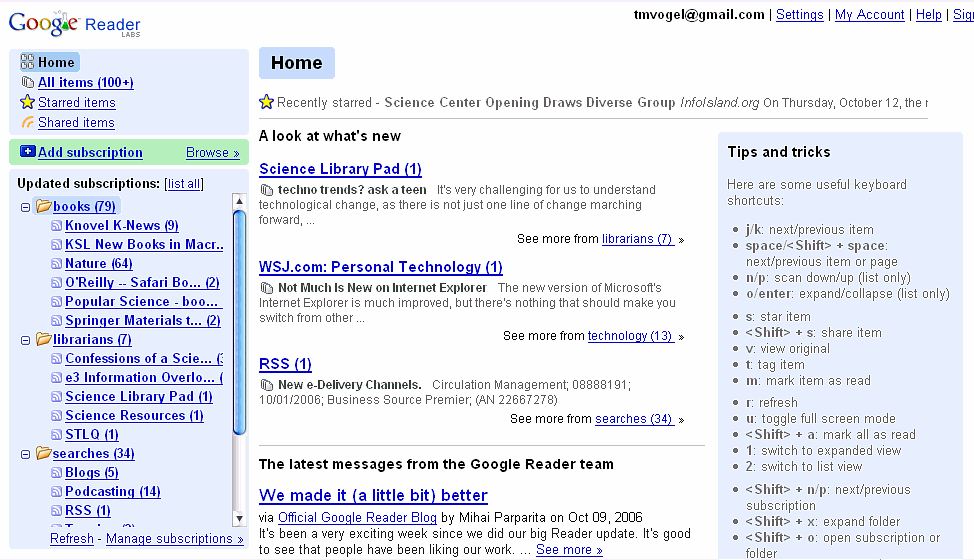
Late last month, Google announced a major revamp to the Reader. I've been working with it now for about two weeks, and the verdict: Very Impressive. It's now a fully functional web-based RSS reader that can rival Bloglines, which as Doug pointed out, hasn't made any major changes/improvements for a while. I've moved about 25% of my feeds over from Bloglines. into it, with no major problems.

What I like (and if any of these were in original version, I can't remember):

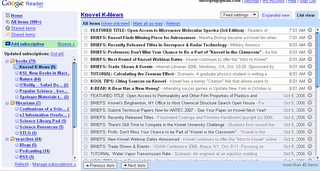
  • The navigation is a vast improvement over previous interface. I can view all of my subscribed RSS feeds, or easily bring up just the ones with updates. The page also opens with "A look at what's new," with what I'm guessing are the most recent headlines. When you click on the updated feed, you can toggle between list (headlines only) and expanded views of the feed entries.
  • It's much easier to delete feeds, or to make batch edits like assigning folders. The first thing I did: delete everything that was in there when I set up the site last fall. Took all of 15 seconds. You can select or deselect all of your feeds, or select just the ones that aren't yet assigned to a folder
  • You can star items to save for future reference, and look at those together. These items are still treated as "marked as read," but you can still get back to them.
  • Lots of keyboard shortcuts (though you lose then once you move off the home view).
  • The Tags option allows you to share by offering a public option for starred items or for feeds within a folder.
  • You can also share items with others: using the provided URL or script to place the last 1-10 headlines on your webpage.
  • There's a subscription bookmarklet you can add to your bookmarks toolbar.

Google Reader Image
Google Reader Image


A few things that need work:
  • In several instances, it did not recognize the feed I wanted to import, like the feeds from Knovel (other than K-News).
  • It's a wee bit slow at times, and when it's loading or adding feeds the browser throbber doesn't do anything. All you get is an image of the Google Labs flask with bubbles coming out of it.
  • You cannot get a total of unread items beyond 100. It just becomes 100+ .
  • You cannot adjust the frames, so you may need to rename some of the longer feeds to something shorter.
I'm still checking to see how Google Reader handles feeds from journals and database searches, which have been a problem in Bloglines when the new content wouldn't show up in bold unless I changed one of the subscription settings.

Overall, the Google developers have done a great job to make this a fully functional, useable RSS reader.


AddThis Social Bookmark Button